;transform: ;msFilter:;'%3E%3Cpath d='m20.487 17.14-4.065-3.696a1.001 1.001 0 0 0-1.391.043l-2.393 2.461c-.576-.11-1.734-.471-2.926-1.66-1.192-1.193-1.553-2.354-1.66-2.926l2.459-2.394a1 1 0 0 0 .043-1.391L6.859 3.513a1 1 0 0 0-1.391-.087l-2.17 1.861a1 1 0 0 0-.29.649c-.015.25-.301 6.172 4.291 10.766C11.305 20.707 16.323 21 17.705 21c.202 0 .326-.006.359-.008a.992.992 0 0 0 .648-.291l1.86-2.171a.997.997 0 0 0-.085-1.39z'%3E%3C/path%3E%3C/svg%3E)

If you’re an organisation with a Facebook Fan Page, a time is likely to come where you need someone else to be able to administer your page. This is particularly the case in companies, when the person who created the page goes on holiday or is out of the office.
It’s very simple to add to the admins of your page – but of course remember that an admin can do everything you can do, so be careful who you give that power to, hehe! You’ll need to give admin status (or your Facebook login details, so I think admin status is best) to your web developer if they’re doing work on a customised page for you.
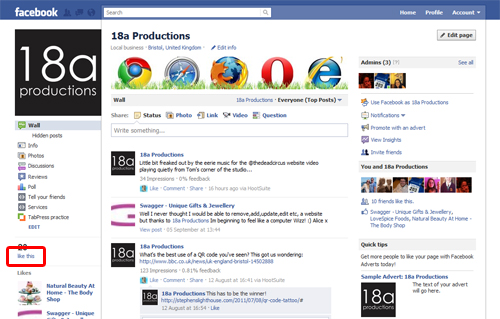
Firstly, view your page whilst logged into Facebook. On the left hand side, you’ll see the number of people who “like” your page. As an admin, the words “like this” will be a blue link for you.
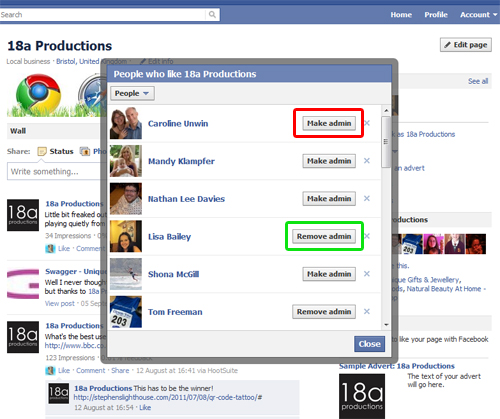
Click the link, and a box will pop up with a list of everyone who likes you. Next to their names, you’ll see a button for “make admin” (highlighted in red on the screenshot below). Simply click the button and Facebook will take you to a new screen, asking you to click the “Save Changes” button. When you do, a little box will pop up asking you for your Facebook password, which just means your personal account password which you use to log into Facebook.

Meanwhile, if you need to stop someone being an admin, because they’ve left your organisation for example, then next to any existing admins you’ll see a button saying “remove admin” (highlighted in green below). Click that, and again, click “Save Changes” on the following screen (the same as the one shown above) and enter your personal password when prompted. Then that person will no longer be able to administer your Facebook Fan page.
The other way of doing all this, is to click on the “edit page” button from the top right of your Facebook Fan Page:

Then select “manage admins” from the left hand side menu, shown below highlighted in red. From that screen, you can start typing one of your friends’ names in the box shown below highlighted in green, or click “remove” as shown below in blue to remove them from being an admin. Remember to “save changes” after you do anything.

If you need a hand with customised Facebook Fan pages, please get in touch.


